Mindoff Dataport
Build high-fidelity Excel and PDF reports from reusable .xlsx templates.
Mindoff Dataport turns styled Excel workbooks into reusable report templates, compiles runtime data into a portable ReportBundle, and exports .xlsx and .pdf outputs while preserving the layout, structure, and styling you designed.



Documentation: https://dataport.mindoff.work
Source: https://github.com/mindoffwork/mindoff-dataport
Key Features
-
Template-First Report Generation
Turn real Excel workbooks into reusable report templates without rebuilding layouts in code. -
One Bundle, Two Formats
The same compiled bundle renders to both.xlsxand.pdf. No second pipeline, no separate styling pass. -
Dataframes Plug Directly Into Templates
Connect dataframe inputs directly to templates so report generation fits naturally into modern data workflows. -
Streaming for Large Exports
In streaming mode, Parquet sources are read in batches and rows are written incrementally. Peak memory stays roughly flat as row count grows, instead of climbing with the dataset. -
Flexible Repeating and Dynamic Sheets
Generate repeated sections and dynamic sheets for customer-wise, region-wise, or report-wise output from a single template. -
Adjustable Layout at Export Time
Column occupation, alignment, and collision shifting are configurable at runtime, without touching the original template.
Performance
Streaming mode holds near-constant peak memory regardless of dataset size. These benchmarks compare it against raw openpyxl, xlsxwriter, and ReportLab loops with equivalent layout and styling (the most direct alternative).
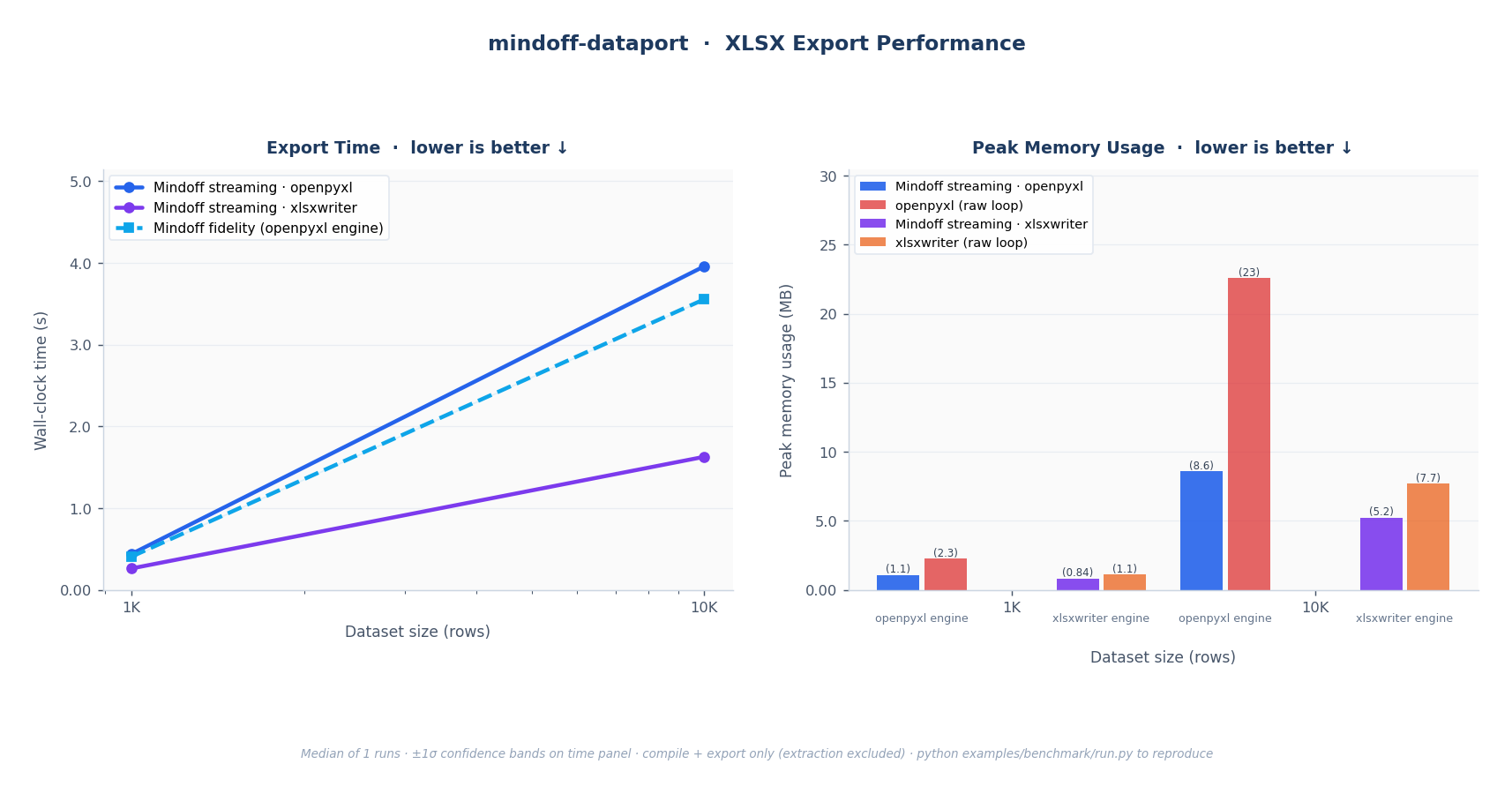
Fig. 1: XLSX export. Left: wall-clock time for all Mindoff modes; both streaming and fidelity scale O(n) linearly. Right: peak RSS; Mindoff streaming holds near-constant while openpyxl and xlsxwriter raw loops grow with dataset size.
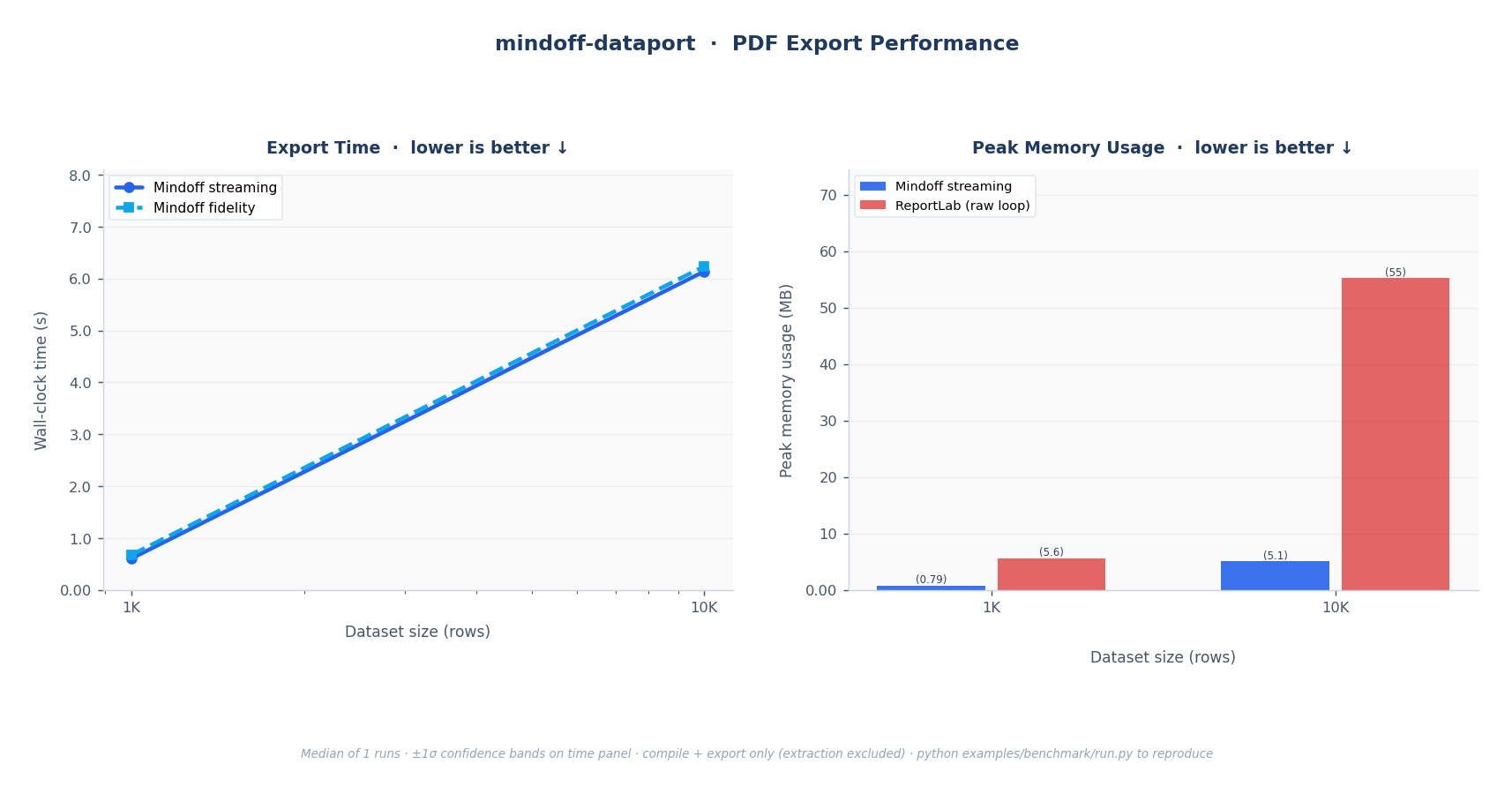
Fig. 2: PDF export. Left: wall-clock time; linear O(n) scaling. Right: peak RSS; Mindoff streaming vs. ReportLab raw loop.
| Scenario | Mode | Why |
|---|---|---|
| ≤ 50K rows, full style fidelity | export_mode="fidelity" |
Full merged-cell and style support; no streaming constraints |
| > 50K rows, XLSX | export_mode="streaming" |
Near-constant memory regardless of row count |
| Any size, PDF | automatic | PDF always paginates; no export_mode setting needed |
| > 1M rows, split output | streaming + max_rows_per_workbook |
Splits output across multiple workbook files |
Full methodology, fairness notes, and instructions to reproduce the numbers yourself are in the Benchmarking guide.
Quick Start
Think of it like a mail merge for spreadsheets: you design the layout once in Excel, then the library fills in the data. Every report follows four steps: extract → inspect → compile → export.
1. Install the Package
For dataframe support (Polars DataFrames or LazyFrames):
2. Extract the Template
Read your .xlsx file into a schema. This captures the layout, every style, and the {{key:type}} placeholders you marked in cells. You run this once per template, not once per report.
import polars as pl
from mindoff_dataport import mo_dataport

template = mo_dataport.extract("invoice_template.xlsx")
3. Inspect What the Template Needs
Before you build a payload, ask the template what it expects. Useful when working with a template someone else designed, or coming back to one after a while.
required_inputs = mo_dataport.inputs(template)
# {'Invoice': {'customer_name': 'string', 'invoice_number': 'number', 'line_items': 'dataframe'}}
The result is sheet-scoped: the outer key is the sheet name, and the inner keys are the placeholders on that sheet with their expected types.
4. Compile: Bind Your Data
Hand the template your real data, keyed by sheet name. The library validates it against the contract from step 3 and produces a ReportBundle: a portable artifact you can export immediately or save to disk and export later.
line_items = pl.DataFrame({"item": ["Widget A", "Widget B"], "amount": [125, 275]})

bundle = mo_dataport.compile(
    template,
    data={
        "Invoice": {
            "customer_name": "Acme Industries",
            "invoice_number": 1024,
            "line_items": line_items,
        }
    },
)
5. Export
Render the bundle to a file. The same bundle drives both formats. No second pipeline.
mo_dataport.export(bundle, "invoice_filled.xlsx")
mo_dataport.export(bundle, "invoice_filled.pdf", format="pdf")
When you're ready to go further (placeholders, the data contract, streaming, repeats, dynamic sheets, custom fonts, and the full API reference), head to the developer guide.
License
Released under the MIT License.